
Simon Scrapes — Agentic OS: Creating Your Own Is Easy
Source: Creating Your Own Agentic OS is Easy (Insanely Powerful) — Simon Scrapes (24:34)
Status: Preliminary reference only — no implementation. Companion source to Nick Milo AI OS plan. Both documents feed the AI OS Rework — Synthesis research.
Screenshots: media.baseworks.com/kb-dev/simon-scrapes-agentic-os/ — NAS mirror: /volume1/baseworks/media/kb-dev/simon-scrapes-agentic-os/
Core Premise
Section titled “Core Premise”“An agentic OS is just clever context management. It’s all about folders, files, any structure that tells your AI tool exactly what it needs to know, exactly when it needs to know it.”
The differentiation between AI users who get great results and those who don’t is not prompting skill — it’s whether they’ve built something underneath the tool. That underlying structure is an agentic operating system. None of it is code: if you can organize a Notion workspace, you can build one.
The failure mode it solves: every session starts from zero. Without a structure, you re-explain your role, your style, and your context every time, and you get generic outputs every time.
The 9 Goals
Section titled “The 9 Goals”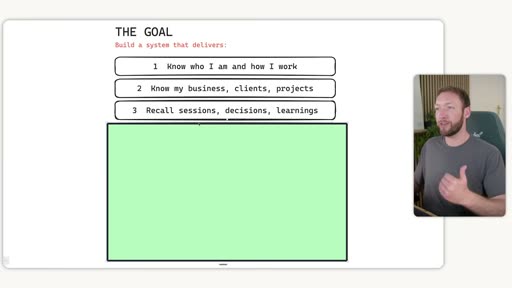
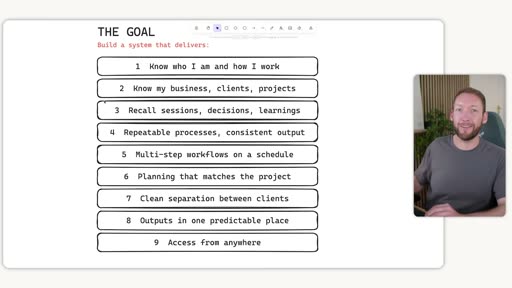
A complete agentic OS delivers:
- Know who I am and how I work
- Know my business, clients, projects
- Recall sessions, decisions, learnings
- Repeatable processes, consistent output
- Multi-step workflows on a schedule
- Planning that matches the project
- Clean separation between clients
- Outputs in one predictable place
- Access from anywhere
Each one of these is a section in the video and a limitation of out-of-the-box LLMs. The video walks through all nine, building up a full architecture diagram.
1. Static Context — Who You Are and Your Business
Section titled “1. Static Context — Who You Are and Your Business”
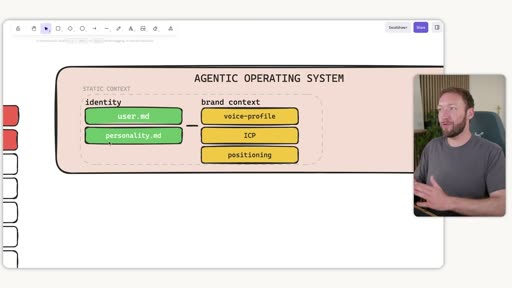
Static context doesn’t change often. It covers two things: who you are (identity) and who your business is (brand context).
Identity files
Section titled “Identity files”Every agentic tool reads an identity file on session start — it just goes by different names:
- Claude Code:
CLAUDE.md - Codex / some others:
agents.md - Open Claude:
soul.md
The recommended approach: let AI interview you rather than writing from scratch. Open a tool with past conversations, use its built-in “ask user questions” feature, and say something like: “I’m building my identity file, ask me 15 questions about how I work, what I want, how I want you to respond.” From those answers, generate the file.
Two identity files with distinct purposes:
user.md— about the user: who they are, how they work, what they wantpersonality.md/SOUL.md— the agent’s personality: tone, style, how the AI responds
Brand context folder
Section titled “Brand context folder”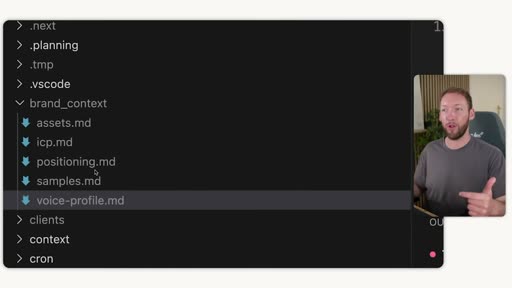
A brand_context/ folder containing:
voice-profile.md— comprehensive log of all brand messaging examples across every channelicp.md— ideal customer profilepositioning.md— market positioning frameassets.md— brand links, scraped automatically on installsamples.md— examples of brand voice
The key architectural point: update it in one place and all skills pull from it. This alone — having inbuilt brand context accessible to every skill — is described as a “3x to 10x” output quality improvement for knowledge work.
The context/ folder (actual file structure)
Section titled “The context/ folder (actual file structure)”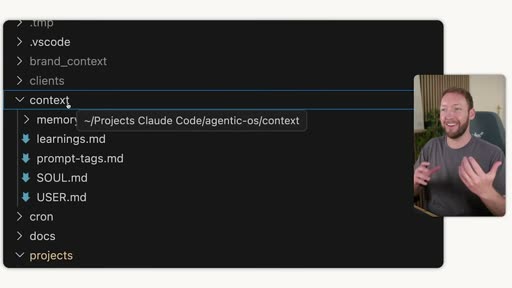
In Simon’s own OS, the context/ folder contains: SOUL.md, USER.md, learnings.md, prompt-tags.md, and a memory/ subfolder.
2. Memory — Dynamic Context
Section titled “2. Memory — Dynamic Context”The problem: out-of-the-box memory is poor. Filling the context window degrades recall — this is called context rot. For ongoing business use, context rot makes it impossible to maintain project continuity across sessions.
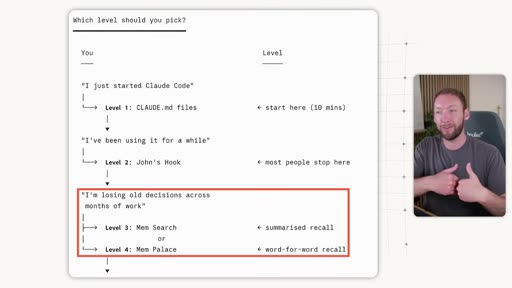
The 6-Level Framework
Section titled “The 6-Level Framework”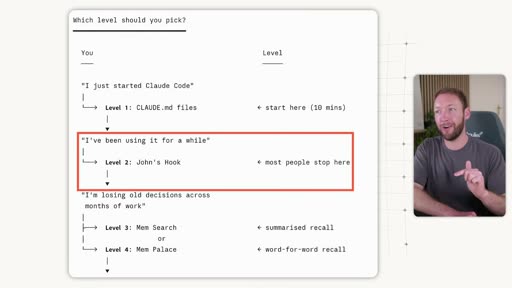
| Level | Tool | What it does | When to use |
|---|---|---|---|
| 1 | CLAUDE.md / agents.md | Static rules loaded at session start. Claude reads them but isn’t forced to act. | Starting point — everyone has this. |
| 2 | Session start hook (“John’s Hook”) | Deterministically forces project context into the conversation window every session — no opt-out. | Most people land here. Stops context from being missed. |
| 3 | Mem Search / Claude Mem | Semantic search over structured markdown conversation logs. Recalls the most relevant memory pieces by meaning, not keyword. | 80/20 recommendation — combine 1+2+3. |
| 4 | Mem Palace | Word-for-word verbatim recall. | Client work where exact phrasing matters. |
| 5 | Karpathy’s LLM Wiki / knowledge bases | Deep research with linked subtopics. | Specific research-heavy use cases. |
| 6 | Open Brain / MemO | Portable database you own — cross-tool, cross-device shared memory. | One brain across every AI tool. |
The 80/20: Levels 1+2+3 stack naturally, use a similar folder structure, and Claude Code can integrate them. This is sufficient for most people.
Key distinction — Level 1 vs Level 2: A CLAUDE.md file tells Claude to read a context file — but Claude doesn’t have to listen. A session start hook forces that action deterministically, whether Claude would choose to or not.
Memory in the full Agentic OS diagram
Section titled “Memory in the full Agentic OS diagram”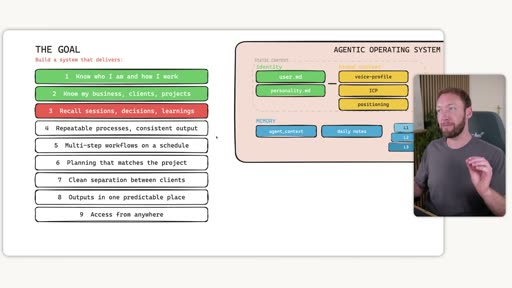
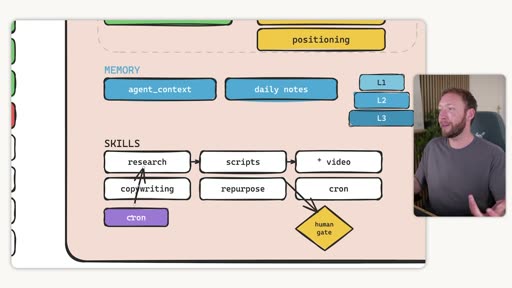
In the OS diagram, memory appears as agent_context and daily notes (the dynamic layer) plus L1/L2/L3 memory level indicators.
3. Repeatable Processes — Skills
Section titled “3. Repeatable Processes — Skills”
LLMs are generalists by design. To get specialist, consistent output, you have to teach the AI your specific processes through skills.
Progressive Disclosure — 3-level skill design
Section titled “Progressive Disclosure — 3-level skill design”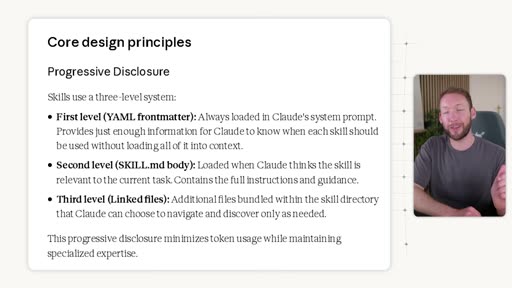
Skills use a three-level loading system:
- First level (YAML frontmatter) — always loaded in Claude’s system prompt. Contains only name and description — just enough for Claude to know when the skill is relevant. Doesn’t bloat the context window.
- Second level (SKILL.md body) — loaded when Claude determines the skill is needed. Contains full step-by-step instructions. Keep this under 200 lines — a known-reliable upper bound for Claude recall.
- Third level (linked files) — additional context (examples, best practice) bundled inside the skill directory. Claude can choose to load these per-step, only when needed, keeping the context window lean.
Skills must reference brand context
Section titled “Skills must reference brand context”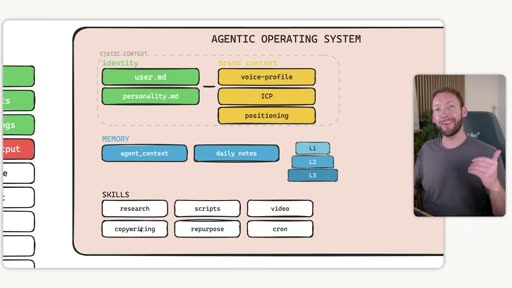
Every skill should pull from brand_context/ at the appropriate step. The copywriting skill loads voice-profile.md; the research skill loads icp.md and positioning.md. This is not a nice-to-have — it’s what separates generic output from brand-accurate output.
Self-learning skills
Section titled “Self-learning skills”Add a step at the end of each skill that asks for feedback, writes it to learnings.md, and reads that file before running again. This closes the loop: use → feedback → improvement, with no manual maintenance.
Agentic OS with skills layer
Section titled “Agentic OS with skills layer”
4. Skill Systems — Chained Workflows
Section titled “4. Skill Systems — Chained Workflows”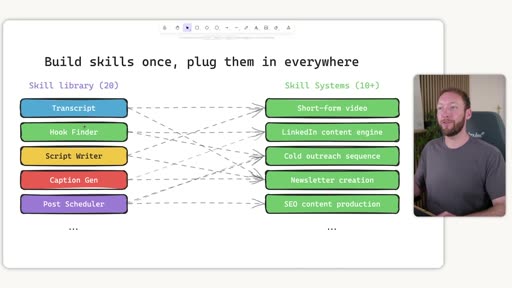
A single skill in isolation saves some time. A skill system — multiple skills chained together — is where you actually get time back.
“I want you to start thinking about your skills not as single isolated skills but as part of a full pipeline or process.”
The example: a Transcript skill is reusable across short-form video creation, newsletter writing, and blog article generation. Build it once; chain it into multiple systems.
A skill system has:
- A skill orchestrator — a meta-skill that chains individual skills in sequence
- Human-in-the-loop gates at review or approval steps (optional, not mandatory)
- A cron job to run on a schedule without you present
5. Planning That Matches the Project
Section titled “5. Planning That Matches the Project”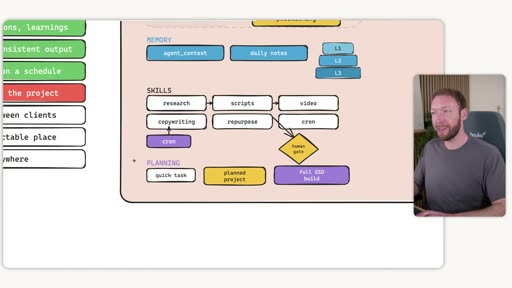
Three planning levels matched to task complexity:
| Level | Tool | Use case |
|---|---|---|
| Quick task | Claude’s built-in shift+tab planning mode | Day-to-day tasks |
| Planned project | PRD-style — scopes into files with checkboxes | Half-day to multi-day work |
| Full GSD build | Get Shit Done (GSD) framework — plan / execute / verify phases | Complex, long-running builds (full SaaS, etc.) |
Why GSD specifically solves context rot: GSD breaks a complex project into phases. Each phase has its own plan → execute → verify cycle, injecting only the relevant context at each step rather than dumping the full project brief into one context window.
6. Multi-Client Architecture
Section titled “6. Multi-Client Architecture”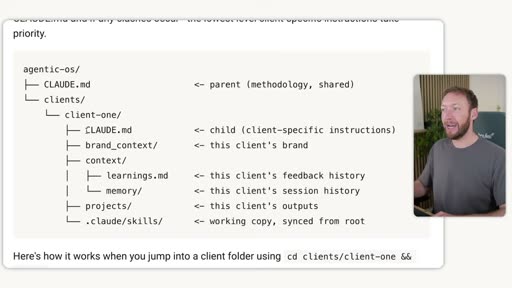
For anyone working across multiple clients or projects, clean separation is critical.
The architecture uses Claude Code’s context inheritance from parent folders:
agentic-os/├── CLAUDE.md ← parent (shared methodology)└── clients/ └── client-one/ ├── CLAUDE.md ← child (client-specific; overrides parent where needed) ├── brand_context/ ← this client's voice, ICP, positioning ├── context/ │ ├── learnings.md ← accumulated feedback for this client │ └── memory/ ← session history for this client ├── projects/ ← all outputs for this client └── .claude/skills/ ← working copy synced from rootShared layer (root): skills, scripts, methodology — update once and every client benefits.
Per-client layer: brand context, memory, learnings, projects — fully isolated so Client A’s voice profile never bleeds into Client B.

When you cd into a client folder, Claude Code reads that client’s CLAUDE.md (which inherits from the root CLAUDE.md). The lowest-level client-specific instructions take priority.
7. Outputs in One Predictable Place
Section titled “7. Outputs in One Predictable Place”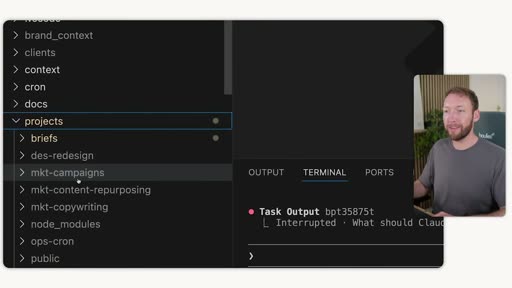
Out of the box, AI stores outputs wherever it wants — terminal window, random subfiles, no defined structure. This makes outputs hard to find and impossible to build on.
The fix: a projects/ folder organized by skill and skill system type:
- Single-skill outputs: organized by skill category (marketing, ops, etc.)
- Skill system outputs: stored in
briefs/alongside the plan that generated them
8. Access from Anywhere
Section titled “8. Access from Anywhere”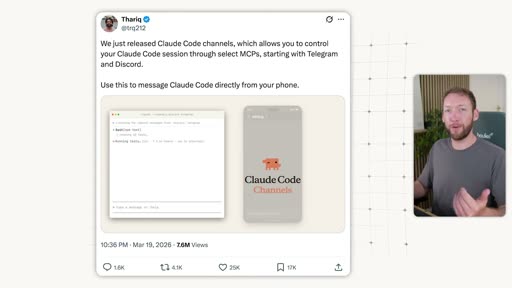
Two-part solution:
- Run on a server, not just your laptop — VPS or cloud hosting keeps the system running and scheduled tasks firing even when your machine is off.
- Access layer via messaging — Claude Code Channels (Anthropic’s feature) lets you message your Claude Code instance from a phone via Telegram or Discord. The instance still has full access to all underlying files and context.
Full Architecture
Section titled “Full Architecture”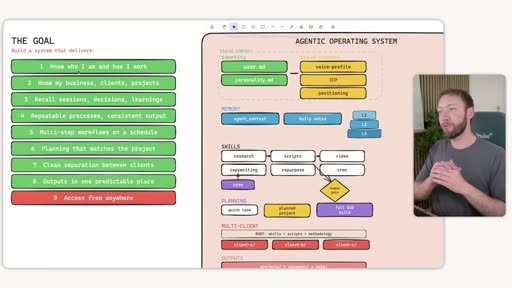
The complete diagram shows all layers:
- Static Context:
user.md,personality.md,voice-profile,ICP,positioning - Memory:
agent_context,daily notes, L1/L2/L3 - Skills: research, scripts, video, copywriting, repurpose, cron
- Planning: quick task → planned project → full GSD build (with human gate)
- Multi-Client: root (skills + scripts + methodology) → client-a, client-b, client-c
- Outputs: per-client
projects/folders
“This architecture is completely portable. The tools are going to keep changing, but the underlying structure and foundations that you built here are going to stay true.”
Comparison with Nick Milo
Section titled “Comparison with Nick Milo”Both frameworks agree on the core idea: identity files + navigation/context layer + skills = a portable, tool-agnostic AI system. They differ in emphasis and abstraction level.
| Aspect | Nick Milo | Simon Scrapes |
|---|---|---|
| Frame | Knowledge management (Obsidian-native) | Business/productivity OS (Claude Code-native) |
| Identity | me.md — personal identity, philosophy, how you think | user.md + personality.md/SOUL.md — split between operator profile and agent personality |
| Navigation | vault-map.md — how AI navigates your ideaverse | brand_context/ folder — business context referenced by skills |
| Skills | skill-map.md + AIOS/Skills/ — plain markdown, portable | Progressive Disclosure skills — 3-level loading to manage context budget |
| Memory | AIOS/History/ — date-stamped AI interaction log | 6-level framework — from CLAUDE.md static rules to cross-tool semantic search |
| Tool entry point | CLAUDE.md = one-liner redirect to me.md | CLAUDE.md = parent methodology; child CLAUDE.md per client |
| Multi-vault / multi-client | Multi-ideaverse model (personal / team / family) | Multi-client folder inheritance (shared root + per-client override) |
| Portability | Tool-agnostic: me.md works anywhere | Somewhat Claude Code-specific (hooks, context inheritance, Channels) |
Key difference: Nick Milo’s model is more oriented to personal knowledge and portability across tools. Simon Scrapes’ model is more oriented to business workflows, client separation, and autonomous scheduled execution. They are complementary — Milo’s me.md + vault-map.md concept pairs well with Scrapes’ brand context + skill system architecture.
Mapping to the Baseworks KB — Observations
Section titled “Mapping to the Baseworks KB — Observations”| Simon Scrapes’ Element | Baseworks KB — Current State | Gap / Consideration |
|---|---|---|
user.md — operator profile | No equivalent. Patrick’s identity is embedded in ~/.claude/CLAUDE.md (global, Claude-specific). | A portable user.md at the vault root would make Patrick’s profile accessible to any AI tool. |
SOUL.md / personality.md — agent identity | Partial — CLAUDE.md contains behavior instructions, but not a distinct agent persona. | Could be extracted into a separate SOUL.md if a distinct agent personality is useful for Baseworks. |
brand_context/ folder | Strong analogue: voice guides, science.md, brand assets docs all exist in 03-resources/. Not organized as a dedicated brand_context/ folder or surfaced for automatic skill injection. | Creating a brand_context/ folder with voice-profile, ICP, positioning as distinct files would make automatic skill injection cleaner. |
| Progressive Disclosure skill design | .claude/skills/ exists. Most skills are not structured for 3-level loading; they’re monolithic. | Refactoring existing skills to load brand context explicitly (Step 1 in each skill) and separate linked examples files would improve output quality. |
| Session start hook (Level 2 memory) | No hook. Context is loaded only if Claude chooses to follow CLAUDE.md instructions. | Adding a UserPromptSubmit hook that forces brand context and vault context into every session is a high-value, low-effort improvement. |
| Semantic memory (Level 3) | No structured session log or semantic search. 00-inbox/ captures some output but isn’t searchable by meaning. | AIOS/History/ equivalent (date-stamped session logs) would give both searchable history and a basis for adding semantic recall later. |
| Multi-client architecture | No equivalent. The vault is shared between Patrick and Asia, but there’s no client-level context isolation. | For Baseworks, “clients” could map to major projects, programs, or audience segments rather than external clients. |
| Outputs folder | Scattered. AI outputs go into various inbox and area folders with no consistent skill-level organization. | A projects/ output folder organized by skill/skill-system type would make AI-generated work easier to find and build on. |
| Access from anywhere | Partial — vault is on a VPS; Claude Code runs on Patrick’s Mac and Asia’s machine. No phone messaging layer. | Claude Code Channels (Telegram/Discord) is available and would allow phone-based access to the full system. |
Open Questions Before Any Implementation
Section titled “Open Questions Before Any Implementation”brand_context/vs existing voice guides — The voice guides are comprehensive and already in use. Abrand_context/folder would either duplicate or reorganize existing material. Is the right move to create symlinks, a dedicated folder, or to update skills to point directly to the existing guides?- Session start hook — What context should be forced in on every session? Brand voice + vault map is the obvious starting point. Needs testing to avoid bloating the context window with content that’s irrelevant to most sessions.
- Skill refactoring — Existing skills (session-summary, create-newsletter, etc.) don’t have progressive disclosure structure. Refactoring them to load brand context explicitly would improve output but requires going through each skill. Worth a phased approach?
user.mdfor Patrick vs Asia — Both use the vault. They have distinct roles and AI working preferences. Separateuser.mdfiles (or a single one with sections) should be planned before implementation.AIOS/History/equivalent — The Baseworks vault has00-inbox/as a loose equivalent. A dedicated, date-stamped AI session log folder would be more searchable and consistent with both this model and Nick Milo’s.- GSD framework — For complex implementation work (not knowledge work), is GSD the right planning framework to adopt, or is the current Claude Code Plan mode + task tracking sufficient?
Related
Section titled “Related”- AI OS Rework — Synthesis
- Nick Milo AI OS — Preliminary Adaptation Plan
- Vault & Tooling — current conventions
- Source video: https://www.youtube.com/watch?v=w0S-khYCaB4