
Chase AI — Claude Code Agentic OS: UNSTOPPABLE
Source: Claude Code Agentic OS = UNSTOPPABLE — Chase AI (19:34)
Status: Preliminary reference. Companion to nick-milo-ai-os-planning and simon-scrapes-agentic-os. Cross-source synthesis in ai-os-rework-synthesis.
Screenshots: media.baseworks.com/kb-dev/chase-agentic-os/ — NAS mirror: /volume1/baseworks/media/kb-dev/chase-agentic-os/
Applicability note: Chase’s frame is a solo creator / AI-agency delivery model. Some elements (client packaging, custom dashboard build, YouTube skill stacks) are adjacent to Baseworks rather than directly applicable. The org chart mental model, the Obsidian memory structure, the local vs remote automation distinction, and the non-technical team access framing all carry forward. The dashboard concept is worth understanding even if not fully built.
The Three Problems
Section titled “The Three Problems”Chase frames the entire system around closing three gaps that affect almost every Claude Code user:
- Memory gap — Claude Code starts every session from zero. No recall of past decisions, prior work, or project state.
- Consistency gap — Getting a specific outcome in a specific way, every time, regardless of how you phrase the prompt.
- Access gap — The terminal interface excludes non-technical team members and clients. Most people will not use a terminal.
“Claude Code is going to be the engine of the agentic OS car. One that remembers everything we’ve done, executes our work in the same way every time, and can be driven by anyone on your team.”
The Conductor Model
Section titled “The Conductor Model”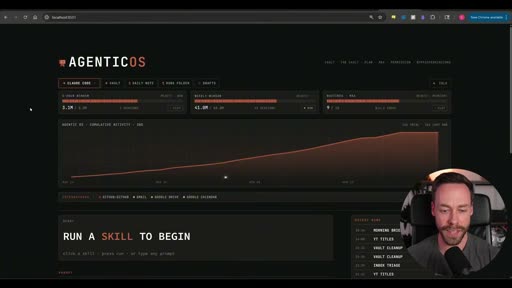
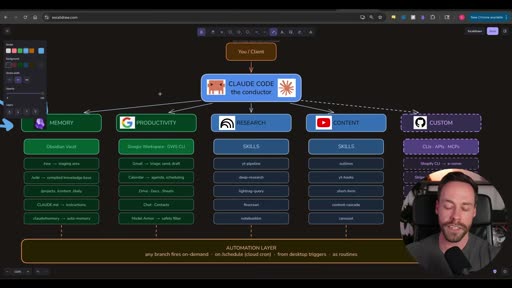
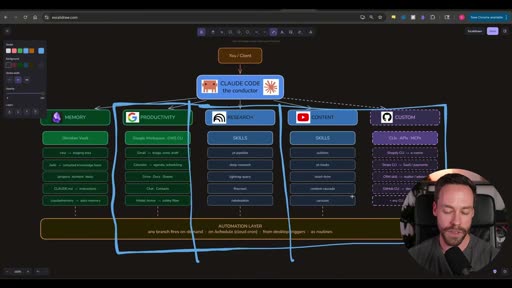
The architecture is deliberately shaped like an org chart — and that framing is intentional. It’s not just a technical diagram; it’s a mental model for how the operator (you) understands and maintains the system.
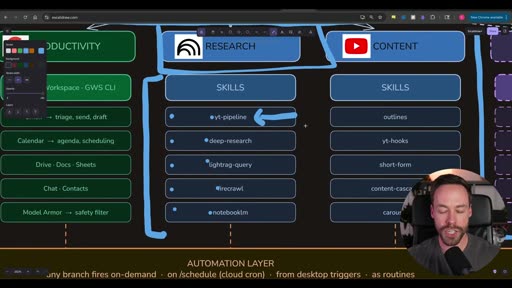
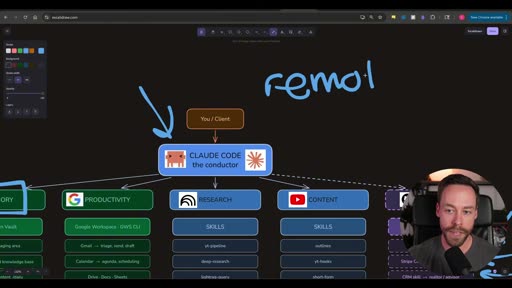
You / Client │ ▼CLAUDE CODE — the conductor │ ├── MEMORY (Obsidian Vault) ├── PRODUCTIVITY (Google Workspace / GWS CLI) ├── RESEARCH (Skills: yt-pipeline, deep-research, lightrag-query, firecrawl, notebooklm) ├── CONTENT (Skills: outlines, yt-hooks, short-form, content-cascade, carousel) └── CUSTOM (CLIs: APIs, MCPs — Shopify, Stripe, GitHub, CRM...) ↓ AUTOMATION LAYER any branch fires on-demand · on /schedule (cloud cron) · from desktop triggers · as routinesClaude Code sits between you and everything else. It’s “the conductor” — not because it controls the process, but because it coordinates all the branches. You talk to the conductor; the conductor knows which branch and which skill to invoke.
Why org chart, not just a folder system
Section titled “Why org chart, not just a folder system”“There’s a reason this kind of looks like an org chart. What you do or what your business does should be kind of thought about in this way — as a mental model in regards to how you can integrate Claude Code.”
Claude Code is smart enough to navigate a flat pile of skills in a single folder. The org-chart hierarchy exists for the human operator, not the AI. So you always know:
- What domains the system covers
- What skills exist in each domain
- What to update when a workflow changes
- What’s missing
This is a different emphasis from Simon Scrapes (Progressive Disclosure, context budget) and Nick Milo (ideaverse portability). Chase’s primary concern is operator comprehension and maintainability.
Memory: Obsidian as the Memory Layer
Section titled “Memory: Obsidian as the Memory Layer”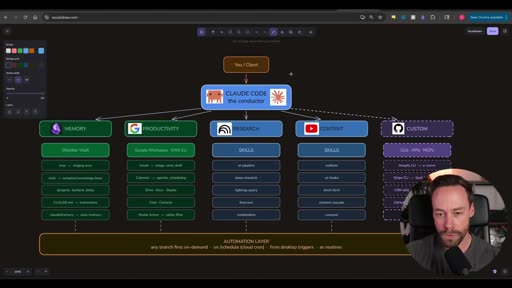
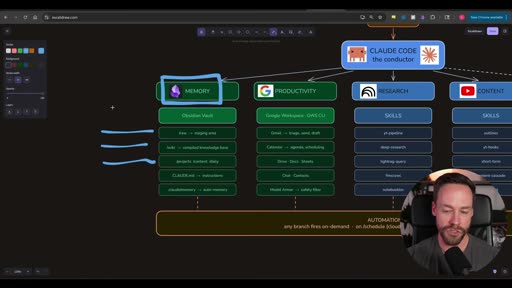
Memory is handled entirely through an Obsidian vault. Chase explicitly recommends against full RAG systems (Supabase, Pinecone, LightRAG) for most use cases:
“For most people, you do not need a full-blown agentic RAG system. You just need some sort of basic form of memory, and Obsidian does this just fine. It’s just folders, guys.”
The Karpathy / raw-wiki-projects structure:
| Folder | Purpose |
|---|---|
/raw | Staging area — new, unprocessed input lands here |
/wiki | Compiled knowledge base — processed, indexed knowledge |
/projects | Active project files and outputs |
/content | Content-specific working files |
/daily | Daily notes |
CLAUDE.md | Instructions for the vault |
claude/memory | Auto-memory — session notes written by Claude Code |
This structure is explicit about the flow of information: raw → processed → referenced. New AI output lands in /raw or a project folder; over time it gets compiled into the wiki. The wiki is what gets searched.
Memory is mandatory: “Memory is a huge value add to any Claude Code system, and it is mandatory in an agentic OS setup.”
Skills: Reflect Your Daily Workflow
Section titled “Skills: Reflect Your Daily Workflow”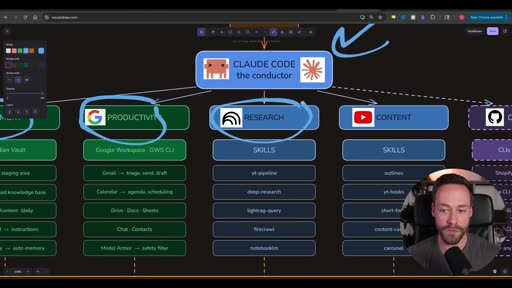
Skills should map directly to day-to-day tasks. The question to ask for each domain:
“What does my [research / content / sales / admin] look like in the morning? What am I doing? Where am I doing it? What do I then do with the output?”
That process becomes a skill. Subtasks under a process become sub-skills. One skill can call other skills — a yt-pipeline skill might call the yt-transcribe skill and the outline skill in sequence.
Skill creator skill: Use Claude Code’s built-in skill creator to generate new skills. It optimizes the name, description, and trigger, and generates testable output so you can measure whether the skill is working. This ensures every skill is built in a consistent, reliable format.
Skills are permanently editable: Creating a skill once doesn’t freeze it. Long-term maintenance means reviewing skills as workflows change and updating them. “Just because you create the skill once doesn’t mean that’s how it has to stay.”
Automations: Local vs Remote
Section titled “Automations: Local vs Remote”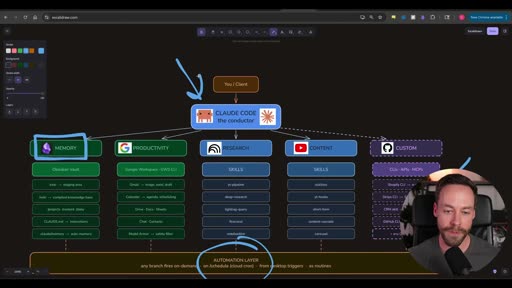
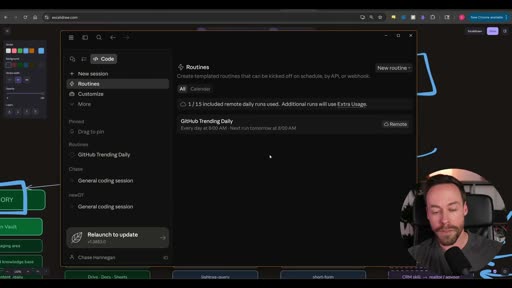
Once skills exist, the next question is whether they run on-demand or on a schedule. If on a schedule, local or remote determines the setup:
| Remote automation | Local automation | |
|---|---|---|
| What it uses | Claude Code’s native tools only (web search, file read, GitHub push) | Local CLIs, local files, machine-installed tools |
| Examples | Daily GitHub trends report; web search → summary → push | NotebookLM CLI, Firecrawl CLI, deep research with local data |
| Machine required | No — runs in the cloud, machine can be off | Yes — requires your machine to be running |
| Setup | Claude Desktop Routines or cloud cron | cron on local machine or Mac mini / VPS |
| Constraint | Cannot access local files or installed CLIs | Full access to everything on the machine |
The Mac mini / VPS insight:
“On a Mac mini, I can do all these local tasks forever — it’s on my computer, it never shuts down, and I have none of the issues of remote. It has the CLIs, it has my local files. You get the best of both worlds.”
A VPS achieves the same: always-on, has local CLIs, can run scheduled tasks. Baseworks already has this infrastructure in place.
Practical decision logic: If the task only uses Claude Code’s built-in tools (web fetch, read, write), it can be remote. If it touches any installed CLI or local file system, it must be local (or on an always-on machine).
The Dashboard / Command Center
Section titled “The Dashboard / Command Center”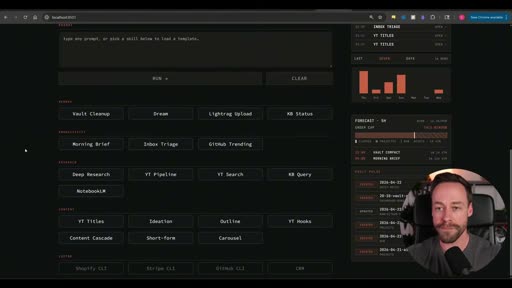
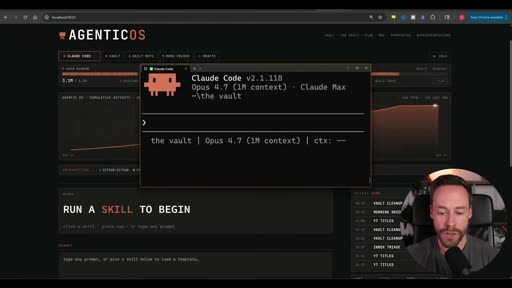
The most distinctive element of this video: a custom web dashboard (built at localhost:5021) that wraps Claude Code running headless in the background.
What it shows:
- Skill buttons, organized by domain — click to run any skill without opening a terminal
- A prompt area for custom inputs
- Usage stats (skill runs, token counts, cumulative activity graph)
- Recent run history
- Forecast of upcoming scheduled routines
- Quick access to the Obsidian vault
How it works: Clicking a skill button fires a Claude Code headless command. Claude Code runs in the background, executes the skill, writes output to the vault, and the dashboard reflects the result. The operator never opens a terminal.
The non-technical access argument:
“If I took a random person off the street and put them in front of this dashboard and said ‘here’s what these buttons do, use them in X or Y use case’ — they just extracted 90% of the power of Claude Code without opening a terminal.”
Chase frames this as both a team onboarding tool (non-technical members can run pre-built workflows) and a client delivery mechanism (you can package skill sets and hand clients a dashboard instead of a terminal).
Honest assessment for advanced users:
Chase acknowledges that terminal-comfortable users won’t get much from the dashboard itself. The real value for experienced operators is the discipline of mapping your workflows into an explicit org chart, and potentially using the dashboard as a one-stop output view — daily AI outputs surfaced on a single screen rather than scattered across vault subfolders.
The Business / Client Packaging Angle
Section titled “The Business / Client Packaging Angle”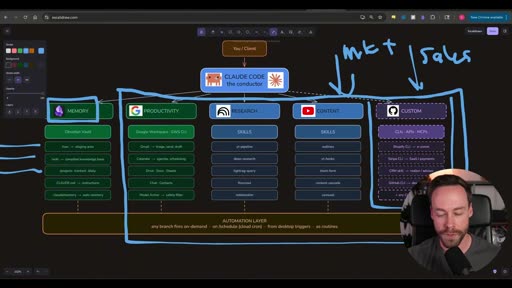
Chase is explicit that this framework has a business development angle: once you’ve built a functional OS for yourself, you can package and sell it to clients.
“Oh, you want the research pack? Oh, you want the content pack? Oh, you want the marketing pack? Being able to package things and slap a name on it does increase the value.”
The pitch to a non-technical client: “Claude Code has memory. It can handle sales, marketing, admin, insert custom function. And by the way, you never need to touch a terminal — we’re going to give you a dashboard. You just click these buttons.”
This is the part most adjacent to Baseworks. Baseworks is not an AI agency and doesn’t have external clients in this sense. However, the underlying principle — that non-technical collaborators (Asia on some workflows, or future staff) should be able to run pre-built AI workflows without terminal access — is directly relevant.
Applicability to Baseworks
Section titled “Applicability to Baseworks”Directly applicable:
| Chase’s Element | Baseworks relevance |
|---|---|
| Org chart mental model | High. A domain map of Baseworks skills (Communications, Practice Platform, Educational Programs, Research, Content) would make the skill library comprehensible and maintainable for both Patrick and Asia. |
| Obsidian as memory (/raw → /wiki → /projects structure) | High. The raw/wiki/projects flow is more explicit than what exists now. Maps to existing vault structure with minor additions. |
| Local vs remote automation distinction | High. The VPS already runs Claude Code. Knowing which skills can run remotely (Claude-native tools only) vs which need the local machine is a practical design decision for every new skill. |
| CLAUDE.md → instructions + claude/memory → auto-memory | High. Directly maps to the existing setup; the auto-memory convention (Claude writes session notes to a dedicated subfolder) is the missing piece. |
| Non-technical access framing | Medium. Asia uses Claude Web and Claude Desktop more than the CLI. A skill-button layer — even if not a full custom dashboard — is worth considering to reduce friction for routine workflows. |
Adjacent / not applicable:
| Chase’s Element | Why not directly applicable |
|---|---|
| Custom dashboard build | Overkill for a two-person team. The value scales with team size and non-technical client count. Worth noting as a future direction if Baseworks hires staff or onboards practitioners to the system. |
| YouTube content skill stack | Specific to Chase’s content business. Not relevant to Baseworks’ knowledge/practice domain. |
| Client packaging / AI agency framing | Baseworks is not an AI agency. |
| Google Workspace / GWS CLI as a branch | Baseworks uses Zoho Mail, not Google Workspace. The concept of a productivity CLI branch is applicable; the specific tooling is not. |
LLM-Agnostic Design — A Key Gap in This Source
Section titled “LLM-Agnostic Design — A Key Gap in This Source”Chase’s model is tightly coupled to Claude Code. The dashboard talks to Claude Code specifically. Skills are written for Claude Code’s format. Routines use Claude Desktop’s scheduling. This is the most Claude-specific of the three sources reviewed.
This is worth flagging because a stated goal for the Baseworks OS is that any LLM should be able to operate within the same structure — one LLM’s session shouldn’t pollute or interfere with another’s interpretation. Chase’s model doesn’t address this; it assumes Claude Code is the only tool in use.
The Nick Milo model handles this better (plain markdown, tool-agnostic files, CLAUDE.md as a thin redirect). For Baseworks, the right synthesis is:
- Structure and content files: tool-agnostic markdown (Milo’s approach)
- Skill execution layer: optimized for Claude Code but written as portable markdown (Simon Scrapes’ progressive disclosure)
- Machine-specific entry points:
CLAUDE.md(Claude Code), future equivalents for other tools if needed
Related
Section titled “Related”- AI OS Rework — Synthesis
- Nick Milo AI OS — companion source
- Simon Scrapes Agentic OS — companion source
- Plans Index
- Source video: https://www.youtube.com/watch?v=pfPi04pIfaw