
Nick Milo AI OS — Preliminary Adaptation Plan
Source: The 3-File AI System That Works With ANY MODEL — Linking Your Thinking with Nick Milo (14:20)
Status: Preliminary reference only — no implementation. This document maps the model and considers how it might apply to the Baseworks KB. Additional sources will be merged here as the plan develops.
Screenshots: media.baseworks.com/kb-dev/nick-milo-ai-os/ — NAS mirror: /volume1/baseworks/media/kb-dev/nick-milo-ai-os/
Core Principle: File Over AI
Section titled “Core Principle: File Over AI”The Obsidian CEO (Kepano) coined “File over App” — your data outlasts any tool because it lives in plain text files, not inside a proprietary platform. Nick Milo extends this: File over AI. If you build your AI workflow inside Claude, or Gemini, or any specific product, you lose that workflow the moment the tool changes. The AI OS model keeps every AI-related process in portable markdown files you own.
“You want your AI processes owned by you, built into your core files and folders… not locked away in any specific tool.”
The Three Layers
Section titled “The Three Layers”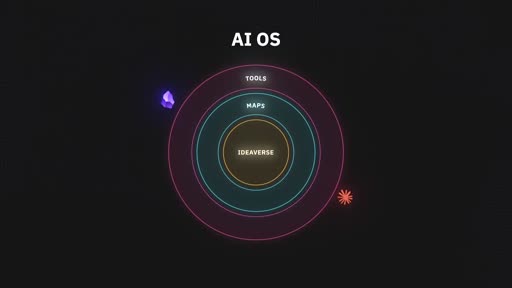
Layer 1 — Ideaverse (core)
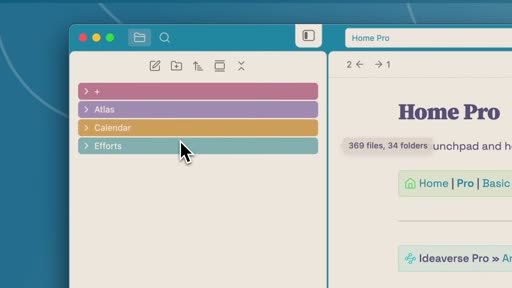
Section titled “Layer 1 — Ideaverse (core)”Your entire personal knowledge base: all notes, ideas, connections, in plain text files. Nick organizes his using the ACE structure — Atlas (knowledge landscape), Calendar (time-based notes), Efforts (projects and tasks). The ideaverse is the center of the AI OS. The more you build it, the smarter any AI becomes when working alongside you.
The ideaverse is irreplaceable — it’s the accumulated thinking that belongs entirely to you and doesn’t exist anywhere else.
Layer 2 — Maps & Manuals (middle)
Section titled “Layer 2 — Maps & Manuals (middle)”The connective tissue between your ideaverse and any external AI tool. This layer contains a small set of files that give AI a structured way to navigate your knowledge without having to scan everything.
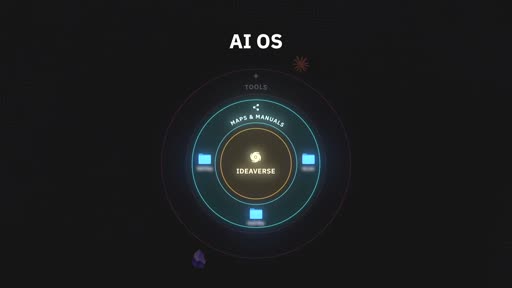
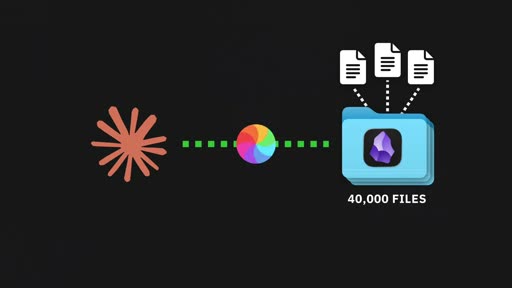
Without a map, pointing an AI at a vault of 20,000–40,000 files is expensive in tokens, slow, and inaccurate. With a map, AI can identify which files are relevant, skip the rest, and build context quickly.
Layer 3 — Tools (outer, most replaceable)
Section titled “Layer 3 — Tools (outer, most replaceable)”The actual applications: Obsidian, Claude, Notebook LM, Gemini, Claude Code, local models. Tools will change — that’s expected. New models release, apps get discontinued, better options emerge. The system is designed so your ideaverse and maps stay central regardless of which tool rotates in or out.
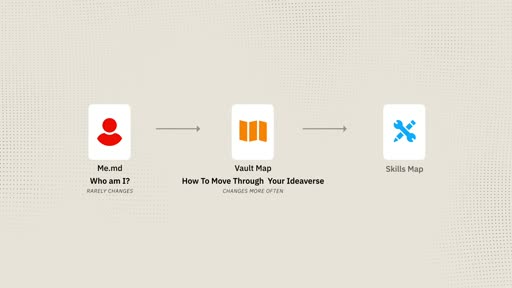
The Three Core Files
Section titled “The Three Core Files”These files all live in Layer 2 (Maps & Manuals). They are plain markdown — no special syntax, no tool-specific features.
File 1 — me.md
Section titled “File 1 — me.md”Question it answers: Who am I? Update frequency: Rarely after initial setup.
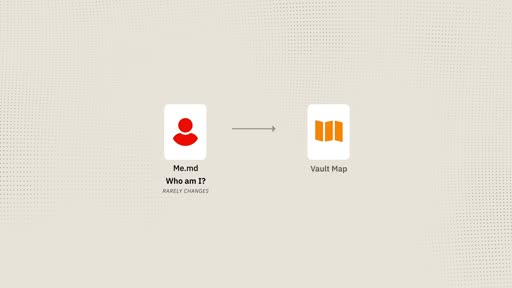
A 50–80 line markdown file that briefs any AI on who you are, how you think, and how you want it to work with you. It’s called me.md because it belongs to you — not to Claude, not to any specific tool. It’s your portable identity.
Lives at: vault root (e.g., /me.md) — not inside the AIOS folder, so it’s always easy to find.
Nick’s structure:
Me  The Summary Statement — high-level who you are and what drives you  First Principles  Mantras / LYT principles I live by  A Hypothesis on Meaning  Values & Virtues  How I Think    The ARC Framework    Three Thinking Styles (top-down, bottom-up, middle-out)    Sensemaking Archetypes  Intellectual Lineage — thinkers who shaped you  Recurring Concepts & References  Spark Lists  Life Reflections  My Roles (personal / professional)
My Working Preferences  Preferences (address by first name, brief, honest pushback, collaborator not tool)  Vibe (skip "great question" / "I'd be happy to help" — just help)  Basic Rules  Pointers to other maps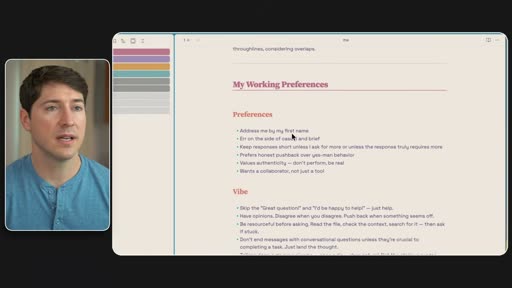
File path links at the top of me.md:
At the very top, me.md includes explicit file paths to the other two maps so any AI can navigate from identity to vault structure to skills in a single session.
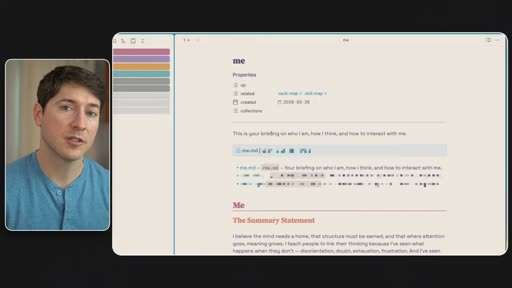
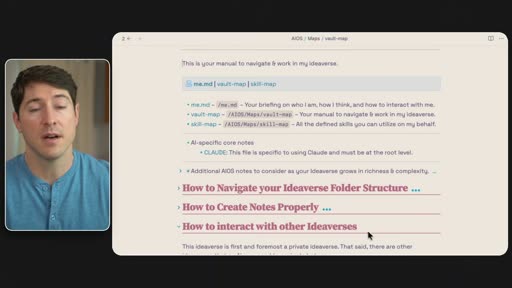
- me.md – /me.md – Your briefing on who I am, how I think, and how to interact with me.- vault-map – /AIOS/Maps/vault-map – Your manual to navigate & work in my ideaverse.- skill-map – /AIOS/Maps/skill-map – All the defined skills you can utilize on my behalf.The CLAUDE.md bridge:
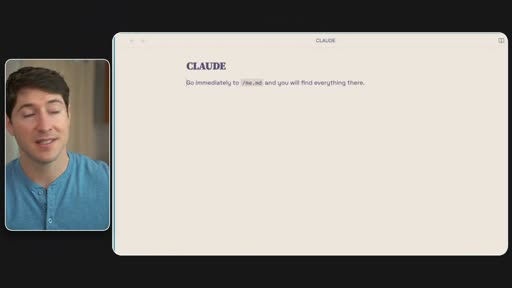
Nick keeps a CLAUDE.md at his vault root — but it contains only one line: “Go immediately to me.md and you will find everything there.” Claude reads it first and immediately pivots to me.md. This is the future-proof bridge: the Claude-specific entry point stays stable as a one-liner, while all actual content lives in the tool-agnostic me.md.
File 2 — vault-map
Section titled “File 2 — vault-map”Question it answers: What is my ideaverse and how should I move through it? Update frequency: More often than me.md — whenever folder structure changes or priorities shift.
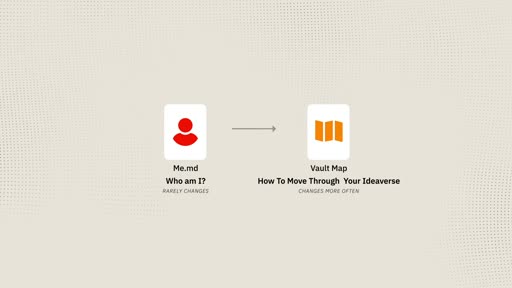
Lives at: AIOS/Maps/vault-map.md
The vault-map is the AI’s manual for navigating and working inside your ideaverse. It answers three questions:
1. How to navigate the folder structure
Section titled “1. How to navigate the folder structure”Brief overview + expanded overview of every top-level folder: what it contains, how it’s organized, what to look for where.
Nick’s brief overview structure:
+ → Inbox (temporary holding for new items)AIOS → AI Operating System folder History/ → All time-stamped AI interaction logs (YYYY-MM-DD Description) Maps/ → vault-map, skill-map, any other navigation files Skills/ → Individual skill documentsAtlas/ → Bases, LYT, Maps, PKM, People, Quotes, Sources, Statements, ThingsCalendar/ → Days, Meetings, Research, ReviewsEfforts/ → Areas, Projects (Active/Simmering/Sleeping), Tasks, Worksx/ → Templates, visuals, extras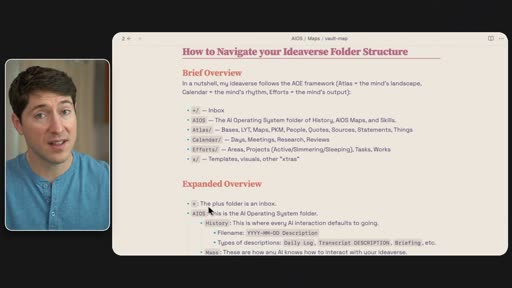
2. How to create notes properly
Section titled “2. How to create notes properly”Note naming conventions, required frontmatter/YAML fields, template locations, and note types for different areas. The AIOS/History folder captures every AI interaction with a date-stamped filename (YYYY-MM-DD Description) so there’s a searchable log of AI activity over time.
3. How to interact with other ideaverses
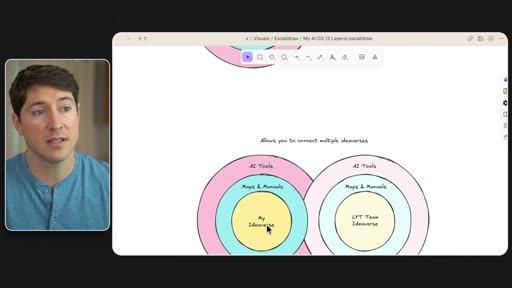
Section titled “3. How to interact with other ideaverses”The vault-map can also describe how this ideaverse connects to other ideaverses — a team vault, a family vault, a shared knowledge base. The Maps & Manuals layer acts as the translation layer, keeping core knowledge private while exposing what’s relevant for shared work.
Multi-ideaverse architecture (future direction): Nick previews connecting multiple ideaverses — his personal one, the LYT team ideaverse, and a family ideaverse — all with their own Maps & Manuals layer. Private knowledge stays private; the translation layer surfaces only what’s needed.
File 3 — skill-map
Section titled “File 3 — skill-map”Question it answers: What processes does AI know how to run for me? Update frequency: Created and updated regularly as new workflows are documented.
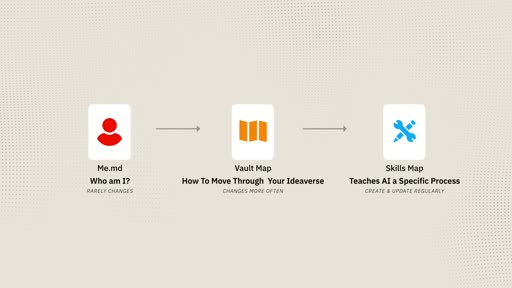
Lives at: AIOS/Maps/skill-map.md (index) + AIOS/Skills/ (individual skill files)
Each skill is a markdown file — plain documentation for a repeatable process. Because they’re markdown, they travel to any AI tool that reads text. Skills are not tool-specific features; they’re mini maps of content for a process.
A skill file includes:
name— machine-readable identifiertriggers— keywords that invoke this skilldescription— what it does in one sentence- Step-by-step instructions
- Output format
Example: holistic-briefing A morning context briefing. Steps: (1) review active projects by priority, (2) assess book/reading momentum, (3) scan intellectual life, (4) identify what you might be forgetting (stalled items, sneaking deadlines, overlooked opportunities), (5) propose 2–4 concrete next actions. Output is a formatted briefing dated to the session.
Nick’s skill-map structure:
Producer Agents:
Personal Assistant  Briefings: holistic-briefing, daily-briefing, shutdown-routine  Email: email-review, drafts-inbox  Files & Maintenance: file-organizer, image-grabber  Meetings: meeting-notes  Reviews: weekly-review
Chief of Staff  chief-of-staff-scan, task-management
Synthesizer Agents:
Mapmaker maps-of-content-mocs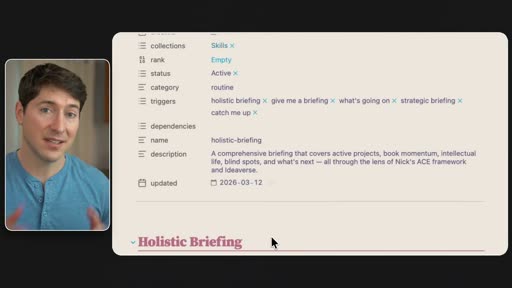
Full System View
Section titled “Full System View”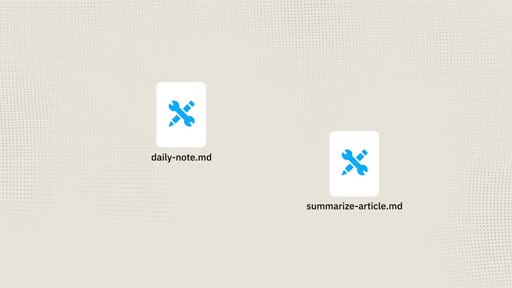
Setup Workflow — Step by Step
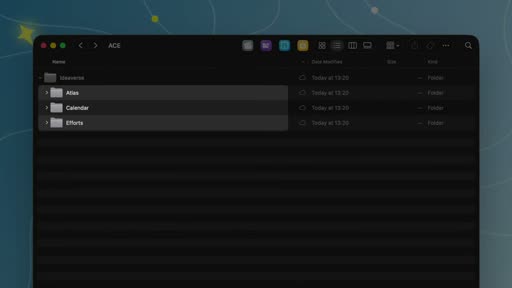
Section titled “Setup Workflow — Step by Step”Step 1 — Create the base folder structure (ACE)
Section titled “Step 1 — Create the base folder structure (ACE)”Create three top-level folders inside your vault:
Ideaverse/ Atlas/ Calendar/ Efforts/Optional additions: + (inbox) and x (templates/extras).
Step 2 — Create the AIOS folder
Section titled “Step 2 — Create the AIOS folder”Inside the vault, create:
AIOS/ History/ Maps/ Skills/This is where all AI-related maps and logs live. It’s separate from the ideaverse content — its own dedicated system folder.
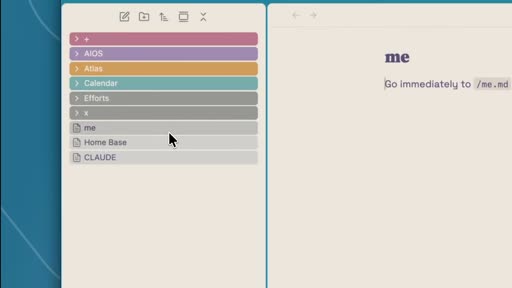
Step 3 — Create me.md at the vault root
Section titled “Step 3 — Create me.md at the vault root”Create /me.md. Start with:
- A summary statement (who you are, what drives you)
- First principles and key beliefs
- How you think (frameworks, styles)
- Your roles
- Working preferences for AI (tone, format, what to skip, what to do)
- File path links to vault-map and skill-map
Write 50–80 lines. This is an evolving document but should feel mostly stable once the core is down.
Step 4 — Create CLAUDE.md (or equivalent) as a redirect
Section titled “Step 4 — Create CLAUDE.md (or equivalent) as a redirect”If using Claude Code or Claude CoWork, create CLAUDE.md at the vault root:
# CLAUDE
Go immediately to /me.md and you will find everything there.
This keeps the tool-specific file as a stable one-liner. All actual content stays in me.md.
Step 5 — Create AIOS/Maps/vault-map.md
Section titled “Step 5 — Create AIOS/Maps/vault-map.md”Document your vault structure. Start with the brief overview (folder names + one-line descriptions), then expand. Add:
- A note on how AI should create files on your behalf (naming, frontmatter, template to use)
- The
AIOS/Historylogging convention - Any section on how to interact with other vaults or shared resources
This file will change more often than me.md — treat it as living documentation.
Step 6 — Create AIOS/Maps/skill-map.md + first skills
Section titled “Step 6 — Create AIOS/Maps/skill-map.md + first skills”Start with 1–2 skills. Suggested starting points:
- How you want your daily note structured
- How you want articles or content summarized
Create each skill as its own .md file in AIOS/Skills/, then reference it from skill-map.md by file path.
Step 7 — Maintain as a garden
Section titled “Step 7 — Maintain as a garden”Every few weeks, review me.md and vault-map:
- Is anything outdated?
- Is it getting bloated? (Trim what’s no longer load-bearing)
- Are there new folder conventions or note types to document?
Skill files get added as new repeatable workflows emerge. There’s no need to build the full library up front.
Privacy and Defense
Section titled “Privacy and Defense”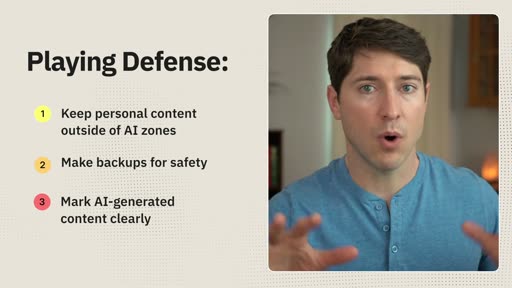
- Keep personal content outside AI zones — journals, deeply personal notes, and sensitive material should stay in folders that AI doesn’t access. Be intentional about what you give AI access to.
- Make backups — your ideaverse is your own; protect it with regular off-site backups.
- Mark AI-generated content clearly — use a tag, emoji, or dedicated folder so you always know what’s yours vs. AI-assisted.
Mapping to the Baseworks KB — Observations
Section titled “Mapping to the Baseworks KB — Observations”This section compares Nick’s model to the current Baseworks KB structure. These are observations, not decisions. No changes should be made until this plan is fully reviewed.
| Nick’s Element | Baseworks KB — Current State | Gap / Consideration |
|---|---|---|
| ACE folders (Atlas / Calendar / Efforts) | 00-inbox, 01-atlas, 02-areas, 03-resources, 04-archive | Different structure with numbered prefix system. Would need a mapping layer or full restructure. |
me.md — portable identity | No equivalent | Identity and instructions are currently inside CLAUDE.md (Claude-specific) and ~/.claude/CLAUDE.md (global). Not portable to other tools. |
vault-map.md — navigation manual | CLAUDE.md in this repo partially covers this | Currently merged with Claude-specific instructions. Not structured as a standalone navigation document. |
CLAUDE.md as one-liner redirect | CLAUDE.md currently contains all instructions | Inverting this would be a significant rework — CLAUDE.md becomes a redirect, all content moves to me.md + vault-map.md. |
AIOS/ folder | No equivalent | New addition — would house History, Maps, Skills. |
skill-map.md + AIOS/Skills/ | .claude/skills/ directory (Claude Code CLI skills) | Our skills are Claude Code-specific and not plain-text portable. skill-map would be a tool-agnostic complement. |
AIOS/History/ — AI interaction logs | Partial — 00-inbox/ captures some AI output | No structured, searchable log of AI interactions. |
| Maps of Content (MOCs) | Scattered through 01-atlas/ | MOCs exist but are not indexed for AI navigation. vault-map would give AI a structured entry point. |
| Multi-ideaverse translation layer | No equivalent | Shared-brain repo is a partial implementation — Asia and Patrick share the same vault. The model would formalize cross-vault interaction. |
Key architectural insight:
Nick’s CLAUDE.md is intentionally a one-liner. His actual instructions live in the portable, tool-agnostic me.md. The current Baseworks approach is the reverse: everything lives in CLAUDE.md. A migration to this model means:
- Extract identity and working preferences →
me.md - Extract vault navigation and conventions →
vault-map.md - Reduce
CLAUDE.mdto a single redirect line - Create
AIOS/folder with History, Maps, Skills substructure - Optionally restructure folders toward ACE (or create a translation map that describes existing folders in ACE terms)
What this model would enable:
- Working with any AI (Gemini, local models, future tools) without reconfiguring from scratch
- Cleaner separation between “who Patrick is” and “how this vault works”
- Portable skills that could run in Claude Web, Claude CoWork, Notebook LM, or a local model
- Searchable AI interaction history in
AIOS/History/ - A foundation for connecting Patrick’s vault to other vaults (Asia’s, a future team/client context)
Open Questions Before Any Implementation
Section titled “Open Questions Before Any Implementation”- ACE vs. current structure — How closely do we adapt ACE? We could either restructure toward ACE or write a vault-map that describes the current folder system in terms an AI can navigate without renaming anything.
- Patrick-only vs. joint — Should
me.mdrepresent Patrick alone, or both Patrick and Asia? Asia has separate voice and workflow context. Likely separateme.mdfiles make more sense. - Skills portability — The
.claude/skills/system works well for Claude Code CLI. Askill-map.mdin AIOS would be complementary (portable), not a replacement. Do both coexist? - Migration risk — The current
CLAUDE.mdis load-bearing for every Claude Code session. Any migration should happen in a separate test branch and be validated before going to main. - Claude Code entry point — Claude Code reads
CLAUDE.mdat the project root. A one-liner redirect tome.mdworks exactly the same way Nick’s setup does — no tool-level changes needed. - Folder restructure vs. translation layer — A full ACE restructure is significant. An alternative: keep current folders, write a vault-map that maps them to ACE concepts so AI understands the structure without moving files.
Related
Section titled “Related”- AI OS Rework — Synthesis — cross-source comparison
- Simon Scrapes Agentic OS — companion source
- Plans Index
- Vault & Tooling — current conventions
- Source video: https://www.youtube.com/watch?v=jbHB-rzKBAs